Requests
HTTP requests are the fundamental building blocks of client-server communication in web APIs. Every interaction between a client and a server begins with a request, which contains all the information necessary for the server to understand what action to perform and on which resource. This AEP offers an educational overview of the HTTP request structure and how its components work together to facilitate API communication.
Understanding HTTP requests is essential for working with APIs effectively. Whether you’re building your first API integration or designing a complex distributed system, familiarity with request structure and semantics will help you debug issues, design better interfaces, and communicate clearly with other developers.
Anatomy of a Request
Section titled “Anatomy of a Request”An HTTP request looks like this:
POST https://mycompany.com/api/v1/usersAuthorization: Bearer secretContent-Type: application/jsonAccept: application/json
{  "name": "Victor Hugo",  "email": "victor@example.com"}
It has four primary parts:
- HTTP Method: The action to be performed (e.g.,
POST). - URL: The specific resource being targeted (including path and optional query parameters).
- HTTP Headers: Metadata providing context for the request.
- Request Body: The data payload (optional).
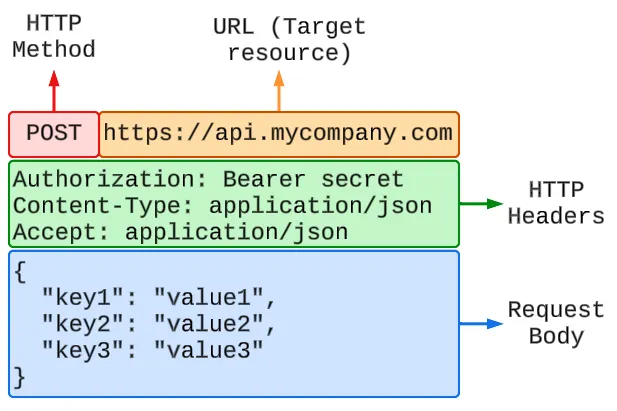
HTTP Method
Section titled “HTTP Method”HTTP methods are standardized actions that indicate the desired operation to be performed on the resource identified in the URL. They define the semantics of the interaction. In other words, the HTTP method is the action (verb) being performed on the resource (noun).
The most common HTTP methods used in REST APIs are:
GETPOSTPUTPATCHDELETE
See AEP-64 for comprehensive guidance and information on HTTP methods, including safety and idempotency.
The URL (Uniform Resource Locator) identifies the specific resource or collection that the request is targeting. URLs provide a standardized way to address resources across the web.
For an educational overview of URLs and their components, see AEP-62.
HTTP Headers
Section titled “HTTP Headers”HTTP headers are metadata fields that provide additional context about the request, enabling the client and server to exchange information beyond the core request components. Headers can specify content types, authentication credentials, caching preferences, accepted response formats, and many other aspects of the request-response cycle.
Headers are organized as key-value pairs, with standardized header names defined in the HTTP specification alongside custom headers that APIs may define for specific purposes. Common request headers include:
Content-Type: Specifies the media type of the request body (e.g., application/json)Accept: Indicates which media types the client can process in the responseAuthorization: Contains credentials for authenticating the requestUser-Agent: Identifies the client software making the request.
Headers are case-insensitive, according to the HTTP specification, though
conventional formatting uses Title-Case ( e.g., Content-Type rather than
content-type or CONTENT-TYPE).
For a comprehensive reference and overview of HTTP headers, see the MDN HTTP Headers documentation. See AEP-148 for custom headers specific to our company APIs.
Request Body
Section titled “Request Body”The request body contains the data payload being sent to the server. This is where clients transmit information such as the representation of a resource being created or modified, input parameters for an operation, or structured data for processing.
Not all requests include a body. The presence and content of a request body depends on the HTTP method being used and the nature of the operation being performed.
For detailed guidance on content negotiation, media types, and how the server interprets the request body, see AEP-105. For specific guidance on structuring JSON payloads, see AEP-107.
Next Steps
Section titled “Next Steps”Once a server receives and processes a request, it sends back an HTTP Response. To understand how servers communicate the outcome of your request, see AEP-61.
Changelog
Section titled “Changelog”- 2026-01-16: Initial creation.